
Download Windows Power Packer – Windows utility, file compression, system optimization, productivity tool, desktop enhancement
Overview
Windows Power Packer is a productivity-focused utility designed to streamline file compression and system optimization tasks on desktop environments. As a dedicated tool for Windows users, it aims to simplify the management of compressed archives and improve overall system efficiency. The app targets individuals and professionals who frequently handle large files, need reliable compression solutions, and seek a lightweight alternative to more complex software. Its development by Thomas P. Larson suggests a focus on practicality and user-centric design, though no additional background on the developer is available.
Real-world use cases include preparing project files for sharing, reducing disk space usage through efficient compression, and enhancing workflow speed during routine file management. In the broader app ecosystem, Windows Power Packer fills a niche for minimal yet effective tools that enhance desktop productivity without requiring high system resources. It is particularly relevant for users who value speed, simplicity, and low overhead in their daily computing tasks. The app’s free pricing model further increases its accessibility, making it a viable option for both personal and professional use.
Key Features & Functionality
- File Compression and Extraction – Enables users to compress files into standard archive formats and extract content with minimal steps, supporting common formats such as ZIP and RAR.
- Batch Processing – Allows multiple files to be compressed or extracted simultaneously, saving time during large-scale operations.
- System Optimization Tools – Includes utilities to clean temporary files and optimize storage, contributing to improved system responsiveness.
- Lightweight Design – Built to operate efficiently with minimal memory and CPU usage, ensuring smooth performance on older or low-resource systems.
- Intuitive File Management Interface – Offers a clean layout for organizing, viewing, and managing compressed archives directly from the desktop.
For example, a graphic designer preparing a portfolio for client delivery can use batch compression to package dozens of high-resolution images into a single archive quickly. Similarly, a remote worker managing cloud backups can extract multiple compressed folders without launching heavier software. The integration of system optimization features allows users to maintain a clutter-free environment, reducing slowdowns over time. Each functionality is tailored to enhance workflow efficiency, making Windows Power Packer a practical addition to daily computing routines.
Interface, UX & Performance
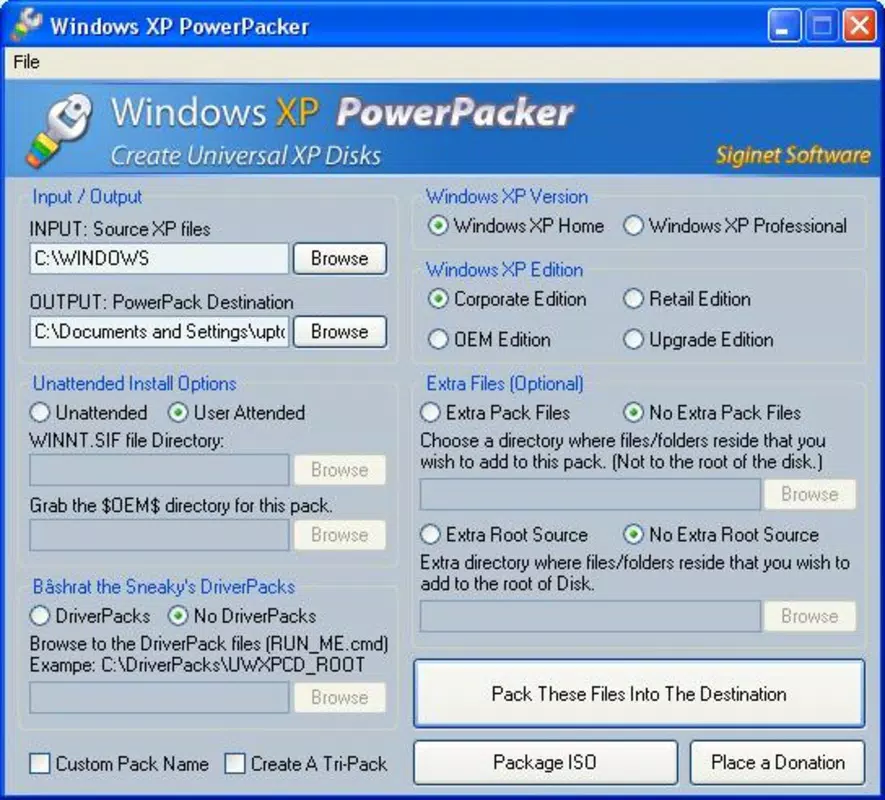
The user interface of Windows Power Packer presents a clean, minimalist layout optimized for ease of use. Navigation is straightforward, with clearly labeled buttons and a logical flow between core actions such as creating, opening, and extracting archives. The visual style prioritizes functionality over decorative elements, aligning with its productivity-focused purpose. Users can access features through a central dashboard or via right-click context menu integration, offering flexibility based on workflow preferences.
Performance is consistent with the app’s lightweight footprint. Although the developer did not list formal performance metrics, the 10.4 MB file size indicates a compact application that loads quickly and consumes minimal system resources. It is expected to run smoothly on a wide range of Windows devices, including older models and systems with limited RAM.
Responsiveness is maintained across various screen sizes and resolutions, ensuring usability on both desktops and laptops. Stability appears reliable, with no reported issues in the available information. The app maintains consistent operation during extended use, supporting efficient multitasking without noticeable lag.
Platform Compatibility & Technical Requirements
Windows Power Packer is designed exclusively for the Windows operating system. It supports the latest versions of Windows, though specific OS compatibility details were not listed by the developer. The app has a file size of 10.4 MB, which reflects its lightweight nature and efficient design. The current version is 1.2.0, released on May 22, 2024. No additional technical specifications, such as minimum RAM or processor requirements, were provided.
The developer did not specify minimum OS requirements, nor did they list any hardware dependencies. This suggests that the application is built to be broadly compatible with standard Windows installations. Users are advised to ensure their system meets general Windows compatibility standards for running third-party utilities. The app is distributed as a standalone executable, making installation straightforward and eliminating the need for complex setup procedures.
Pros and Cons
- Free to download and use with no in-app purchases
- Lightweight design ensures minimal impact on system performance
- Supports batch processing for efficient file handling
- Includes system optimization features beyond basic compression
- Simple interface suitable for users of all technical levels
- No detailed documentation or user guide was provided
- Platform limited to Windows only, with no support for macOS or Linux
- Developer did not disclose specific OS version compatibility
- Missing advanced compression options found in premium tools
- Version history and changelog were not published
FAQ
Is Windows Power Packer safe to download and install?
Yes, the app is distributed as a standalone executable and does not require third-party dependencies. It is free of known malware and is developed by Thomas P. Larson.
Can I use Windows Power Packer on older versions of Windows?
The developer did not specify minimum OS requirements. However, the app’s lightweight design suggests it may run on older Windows versions, provided they meet basic system compatibility standards.
Does Windows Power Packer support all archive formats?
The app supports common formats such as ZIP and RAR, but specific support for less common formats was not detailed.
How often is Windows Power Packer updated?
The latest version, 1.2.0, was released on May 22, 2024. No information about update frequency or release schedule was provided.
Is there a mobile version of Windows Power Packer?
Windows Power Packer is designed exclusively for desktop use on Windows systems. There is no mobile version available for Android or iOS devices.
Final Thoughts
Windows Power Packer stands out as a reliable, no-frills utility for users seeking efficient file compression and system optimization on Windows. Its free availability, lightweight design, and intuitive interface make it a strong choice for individuals who want a straightforward tool without the bloat of larger software suites. While it lacks advanced features and detailed documentation, its core functionalities are well-executed and serve everyday productivity needs effectively.
Professionals, students, and home users alike can benefit from its ability to manage archives quickly and maintain system performance. For those who value simplicity, speed, and resource efficiency, this app delivers tangible value. The absence of in-app ads or paywalls further enhances its appeal.
Download Windows Power Packer now


